Scenario di laboratorio: Routing dinamico con RIPv2
Cisco Packet Tracer – 3 router, VLSM (/26 e /30) nello stesso major network
Configura RIP v2, disattiva l’auto-summarization e verifica che le subnet vengano
propagate con la mask corretta.
Scenario e obiettivi (RIPv2)
Idea chiave: RIP è un protocollo Distance Vector. La metrica resta
il
numero di hop (max 15), ma con RIPv2 gli update sono
classless:
la subnet mask viene trasmessa e le rotte possono usare VLSM.
Perché qui serve RIPv2: in questo scenario tutte le reti appartengono allo stesso
major network
192.168.0.0/24, ma vengono usate subnet diverse (/26 per le LAN e
/30 per i link seriali).
Con RIPv1 (classful) la mask non viene propagata → rischio di interpretazioni errate e routing non
affidabile.
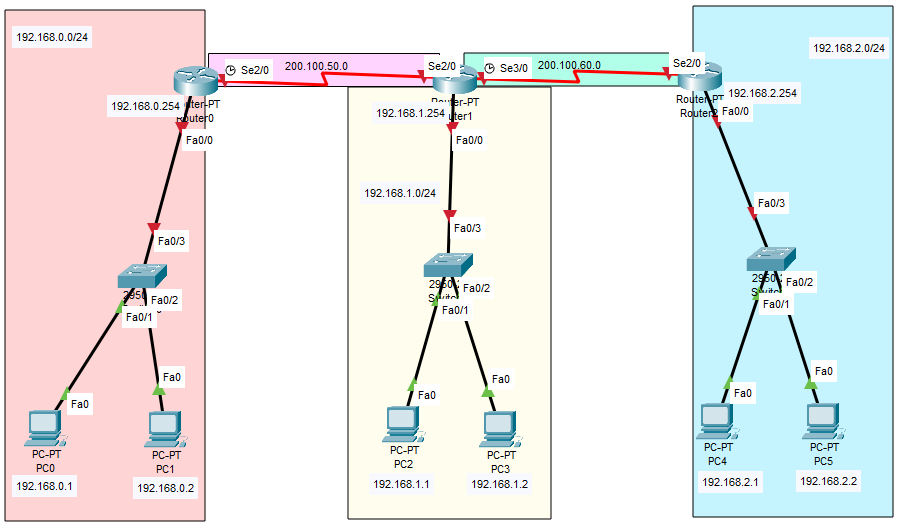
La rete è “lineare” con 3 router:
Router0 ↔ Router1 ↔ Router2.
Le LAN sono in /26 (più host), i collegamenti tra router in /30
(punto-punto).
Obiettivo operativo: dopo la configurazione di RIPv2 ogni router deve apprendere
automaticamente
tutte le subnet remote con la relativa subnet mask.
I PC devono potersi pingare tra LAN diverse (es.
192.168.0.1 →
192.168.0.129).
Topologia e piano di indirizzamento
La topologia usa un unico blocco 192.168.0.0/24 con VLSM: tre LAN /26 e
due seriali /30.
| Elemento | Rete | Uso |
|---|---|---|
| LAN Router0 | 192.168.0.0/26 |
PC0, PC1 – gateway 192.168.0.62 |
| LAN Router1 | 192.168.0.64/26 |
PC2, PC3 – gateway 192.168.0.126 |
| LAN Router2 | 192.168.0.128/26 |
PC4, PC5 – gateway 192.168.0.190 |
| Seriale R0↔R1 | 192.168.0.192/30 |
punto-punto (host tipici: .193 e .194) |
| Seriale R1↔R2 | 192.168.0.196/30 |
punto-punto (host tipici: .197 e .198) |
Gateway dei PC: ogni PC deve avere come default gateway l’IP del router nella
stessa LAN
(es. LAN
192.168.0.64/26 → gateway 192.168.0.126).
In VLSM, un gateway “giusto ma nella subnet sbagliata” equivale a gateway errato.
Prima di RIP: verifica che tutte le interfacce siano up/up e
che i router
“si vedano” sui link seriali (ping tra gli IP delle seriali). Se una seriale è down, RIP non
annuncia quella rete.
Nota sui comandi RIP: nel comando
network è corretto usare
l’indirizzo di rete
(es. 192.168.0.0, 192.168.0.192). Con RIPv2 la mask viene propagata,
quindi il routing resta coerente anche in VLSM.
Configurazione RIPv2 sui router (Packet Tracer)
Logica: abilita RIP, imposta version 2 e disattiva
l’auto-summarization con
no auto-summary. Poi indica le reti direttamente connesse da annunciare.
Punto cruciale: su molti IOS
auto-summary è attivo di default.
In una rete con VLSM questo può causare annunci “aggregati” indesiderati. In laboratorio lo
disattiviamo per
vedere chiaramente tutte le subnet nella routing table.
Router0
enable
conf t
router rip
 version 2
 network 192.168.0.0
 network 192.168.0.192
 no auto-summary
end
wr
Controllo: Router0 deve annunciare
192.168.0.0/26 e la
seriale 192.168.0.192/30.
Senza version 2 e no auto-summary il comportamento può non
essere coerente con VLSM.
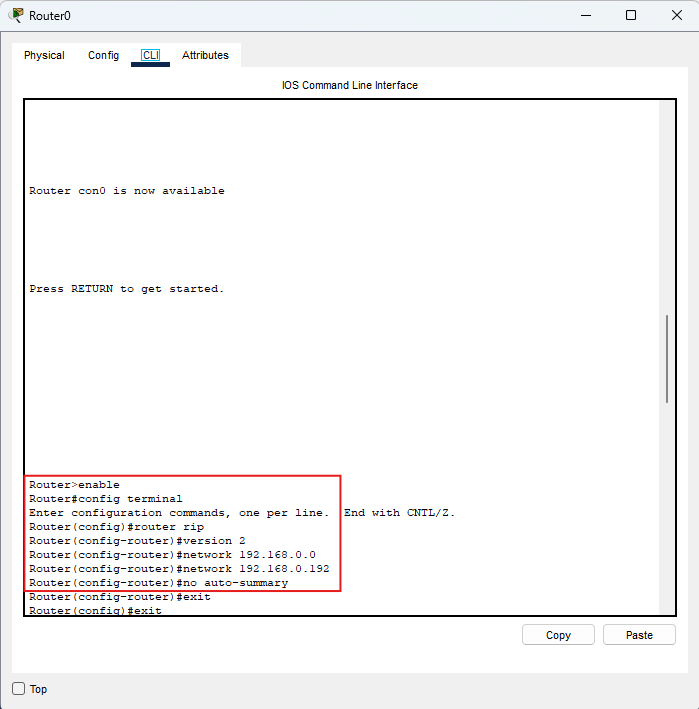
Immagine: comandi RIPv2 su Router0 (version 2 + no
auto-summary).
Router1 (centrale)
enable
conf t
router rip
 version 2
 network 192.168.0.64
 network 192.168.0.192
 network 192.168.0.196
 no auto-summary
end
wr
Ruolo di Router1: collega le due seriali. Se manca una delle due
reti seriali,
le subnet non vengono propagate correttamente tra i due lati della topologia.
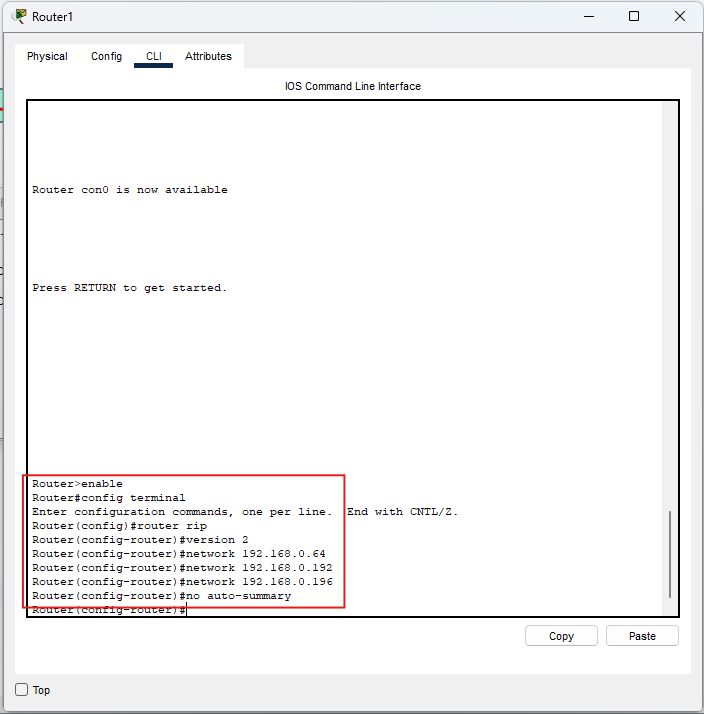
Immagine: comandi RIPv2 su Router1.
Router2
enable
conf t
router rip
 version 2
 network 192.168.0.128
 network 192.168.0.196
 no auto-summary
end
wr
Controllo: Router2 deve annunciare
192.168.0.128/26 e
la seriale 192.168.0.196/30.
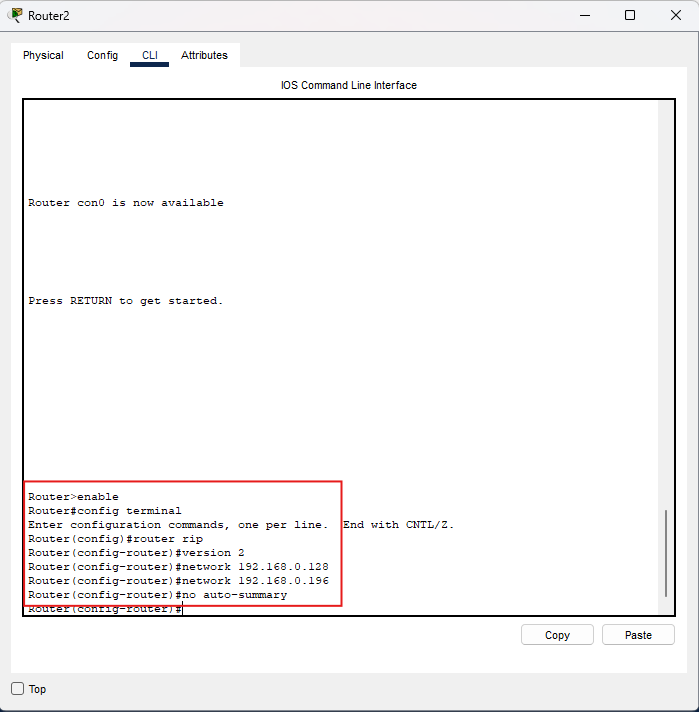
Immagine: comandi RIPv2 su Router2.
Convergenza: dopo l’attivazione, attendi qualche secondo. Se vuoi “stimolare”
l’aggiornamento,
puoi fare un ping tra router sulle seriali e poi ricontrollare
show ip route.
Verifica e interpretazione delle rotte (show ip route)
Prima di RIP: la tabella di routing contiene solo rotte C
(Connected).
Dopo RIPv2 devono comparire rotte R verso le subnet remote, con le rispettive
mask.
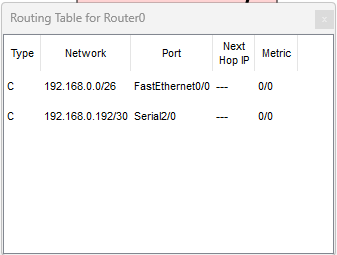
Router0 (prima)
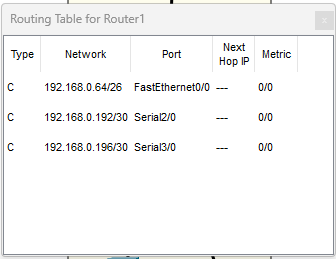
Router1 (prima)
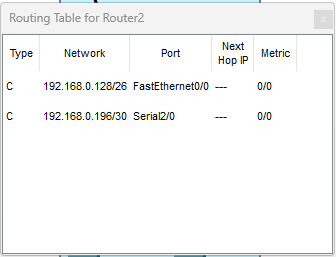
Router2 (prima)
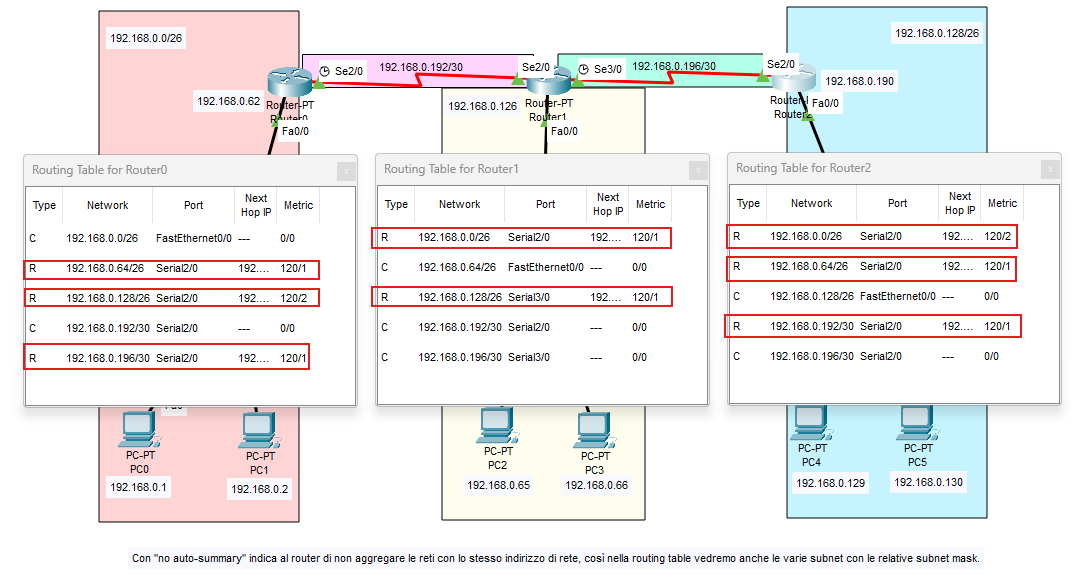
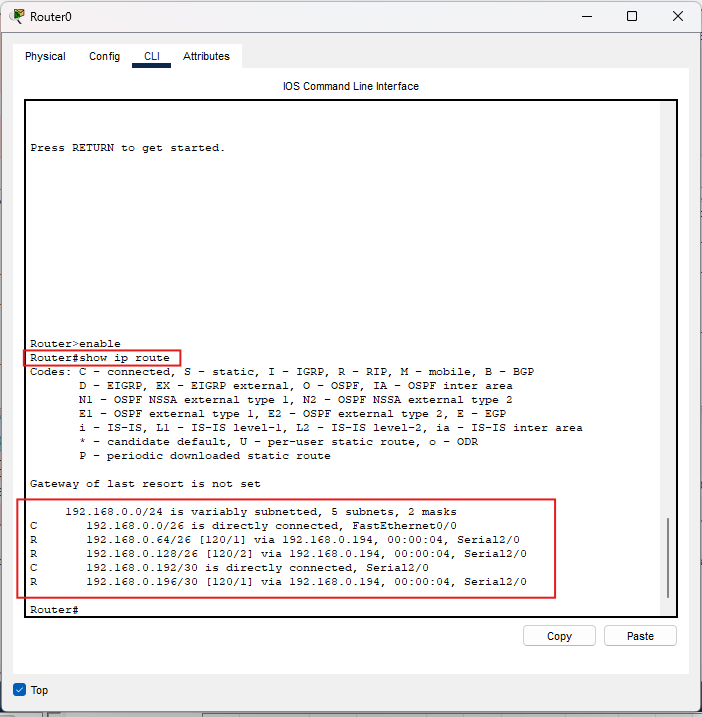
Come leggere una rotta RIP (con VLSM)
Esempio:
R 192.168.0.128/26 [120/2] via 192.168.0.194
- R = appresa tramite RIP
- /26 = mask della subnet (con RIPv2 viene mantenuta)
- 120 = Administrative Distance (RIP)
- 2 = metrica (hop count)
- via = next-hop (router successivo)
Comandi indispensabili:
show ip route→ verifica rotte R e presenza delle maskshow ip protocols→ verifica RIP v2, reti annunciate e timershow run | section router rip→ controllaversion 2eno auto-summary
Test end-to-end: esegui ping tra PC di LAN diverse:
- da
192.168.0.1verso192.168.0.129 - da
192.168.0.130verso192.168.0.65
Troubleshooting essenziale (se non vedi rotte RIPv2 corrette):
- Hai dimenticato
version 2su un router: verifica conshow ip protocols. - Hai dimenticato
no auto-summary: puoi vedere annunci aggregati e rotte non attese in VLSM. - Interfaccia down: verifica
show ip int brief(stato up/up) e cavi seriali/DCE. - Rete non annunciata: controlla i
networkconshow run | section router rip. - Gateway PC errato: deve essere l’IP del router nella stessa subnet (es.
192.168.0.62,192.168.0.126,192.168.0.190).
Riepilogo rapido
- RIPv2 è Distance Vector con metrica hop count (max 15), come RIP v1.
- È classless: propaga la subnet mask → supporta VLSM e scenari “variably subnetted”.
- Config:
router rip+version 2+networkdelle reti direttamente connesse. - In laboratorio: usa
no auto-summaryper evitare aggregazioni automatiche e vedere tutte le subnet. - Verifica:
show ip route(rotte R con mask),show ip protocols, ping end-to-end.